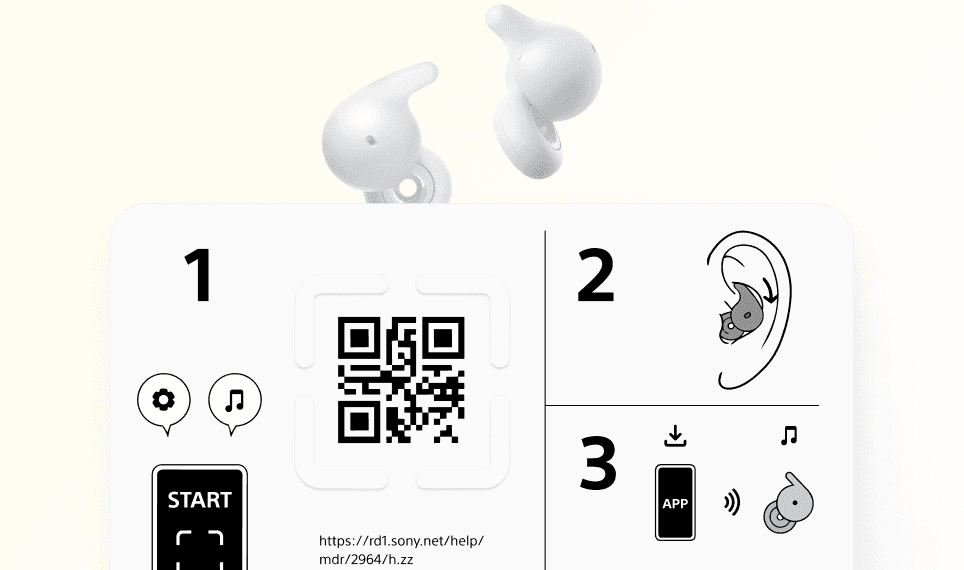

Sony believed their out-of-box experience (OOBE) was accessible. Six moderated sessions showed where it can be improved.
Sony Electronics partnered with our HCDE team to evaluate the out-of-box experience (OOBE) for their LinkBuds Open earbuds. Their goal: ensure the packaging and onboarding was inclusive for users with visual impairments and limited dexterity — a core commitment of Sony's accessibility strategy.
Over 10 weeks, I led accessibility evaluation of the physical packaging and digital onboarding flow — conducting 6 moderated usability sessions, recruiting through 30+ disability advocacy organizations, and delivering severity-prioritized design recommendations to Sony's product team.
Impact
QR code scan success improved from 0% to feasible for visually impaired users — through a targeted set of physical and digital design changes.
6
moderated usability sessions with participants with visual and dexterity impairments
30+
disability advocacy organizations recruited through
8
critical accessibility barriers identified across physical packaging and digital onboarding
0→✓
QR code scan success for visually impaired users — from 0% to feasible
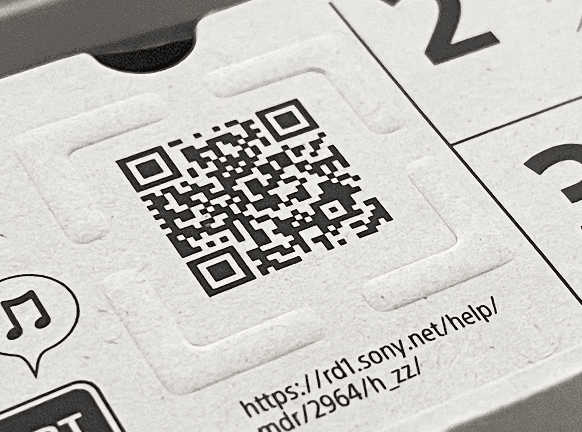
Guide for QR tactile element — the primary focus of the evaluation. On the Sony LinkBuds Open packaging.
/ The Problem
Inclusive design intent doesn't guarantee inclusive experience
Sony's LinkBuds Open packaging included a deliberate accessibility feature — the Guide for QR, a tactile element designed to help users locate the QR code for onboarding. The intent was sound. But our evaluation revealed that the execution created new barriers rather than removing them.
Users we evaluated for
Two underserved groups of users with physical disabilities
Users with limited hand mobility (e.g., arthritis, reduced grip strength) — who struggle with fine motor tasks like pulling tabs, opening compartments, and navigating small elements
Users with visual impairments (blind or low vision) — who rely on tactile cues, screen readers, and audio feedback to navigate packaging and digital interfaces
What we evaluated
Physical + digital OOBE
Digital onboarding — help article navigation, tutorial video discoverability, screen reader compatibility across the web-based onboarding flow
Physical packaging — outer box opening, accessory compartment access, Guide for QR tactile element, QR code visibility and scannability
Sighted user
9 sec
to recognize and locate the QR code
Visually impaired user
9 min 33 sec
to recognize the QR code — with moderator assistance required
Scan success rate
0 of 2
visually impaired participants could scan the QR code independently — before our design interventions
/ Methodology
Moderated usability sessions with real assistive technology users
We recruited through 30+ disability advocacy organizations to reach participants who use assistive technology daily. Each participant unboxed the LinkBuds Open naturally, using think-aloud protocols across three task paths.
Participants
6 participants across two disability groups: blind/low vision (2), limited hand mobility (3), combined (1). Recruited through advocacy orgs to ensure authentic assistive tech users, not simulated impairment.

Our Participant Profiles
Tasks
Three sequential task paths: (1) package opening, (2) Guide for QR and QR code interaction, (3) tutorial video access. Sessions recorded via Zoom and Hovercam with minimal moderator intervention.
Analysis
Qualitative (think-alouds, reflections) and quantitative (task times, success rates) data analyzed via affinity diagramming. Findings prioritized by severity: High (task failure) → Medium (significant friction) → Low (minor inconvenience).

I led data analysis for the QR interaction and Guide for QR tactile element.

P3 interacting with Guide for QR during their usability session — think-aloud protocol with Hovercam tracking
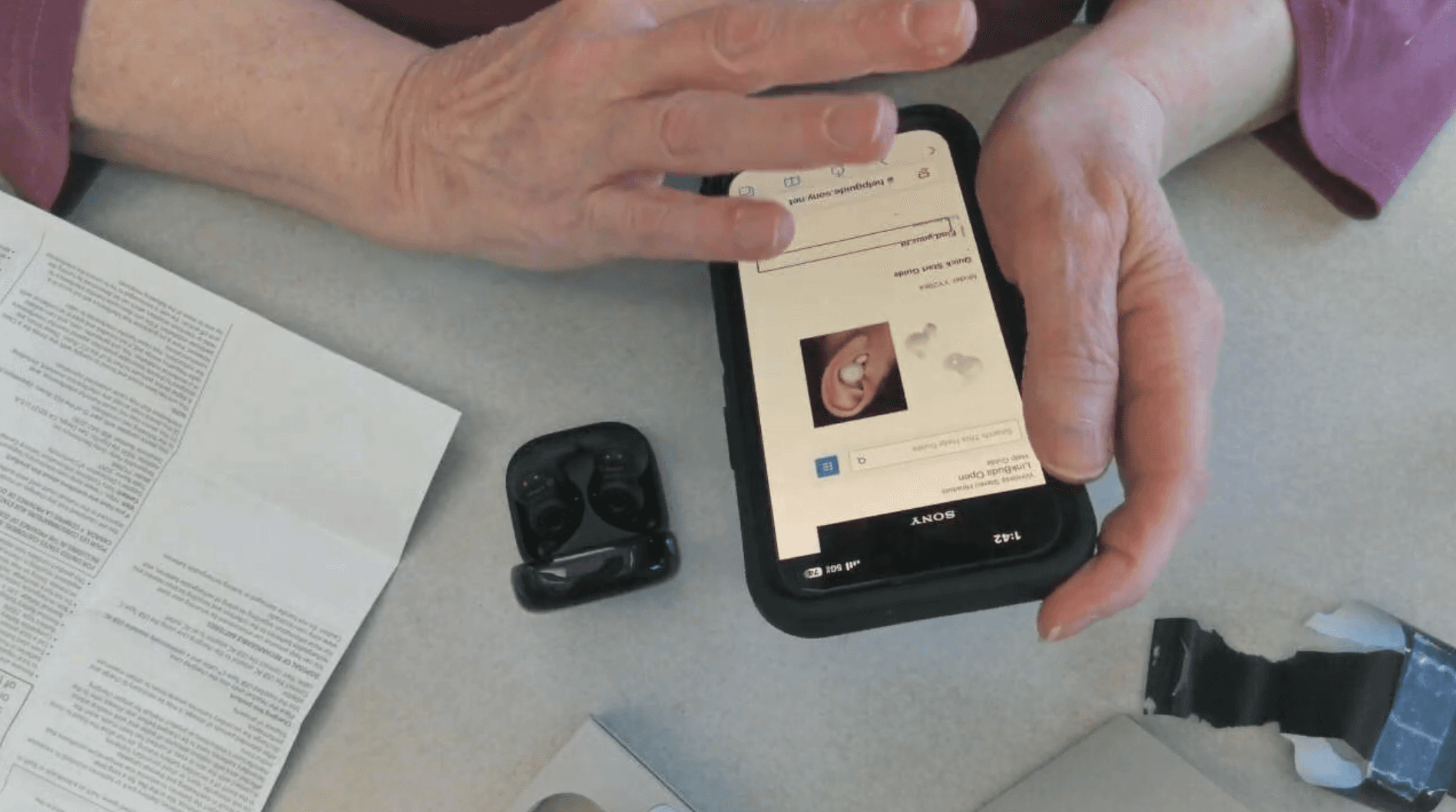
P4 navigating the set-up help article with their assistive technology (screen reader)
/ What We Found
Four barriers, two surfaces, one consistent pattern
Every barrier we identified traced back to a gap between Sony's design intent and the actual sensory experience of users with impairments. The packaging assumed visual scanning and fine motor control that many users didn't have.
Finding 01 — High severity
QR code was unrecognizable for visually impaired users
What happened
0 of 2 visually impaired participants recognized the QR code before moderator assistance. Even 3 sighted participants noted it was too small to notice. The QR code's low contrast and small size made it effectively invisible to anyone relying on non-visual cues.
"With smaller QR codes, you have to hold your phone more steady for it to get a read on the details, or you have to bring it really close. The bigger the QR code, the more shaky your hand can be when you're scanning it because the details don’t matter as much."
– P2, participant with hand dexterity issues
design direction
Increase QR code print size (minimum 2cm × 2cm or 0.8in × 0.8in), increase contrast ratio to WCAG AA standard.
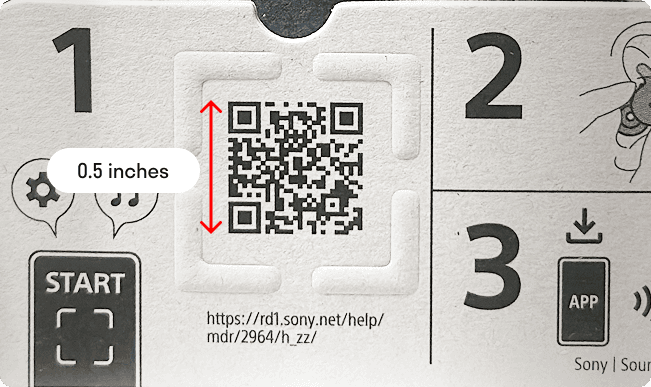
Current: QR code on the package is smaller than the recommended QR code size by Nielsen Norman Group.
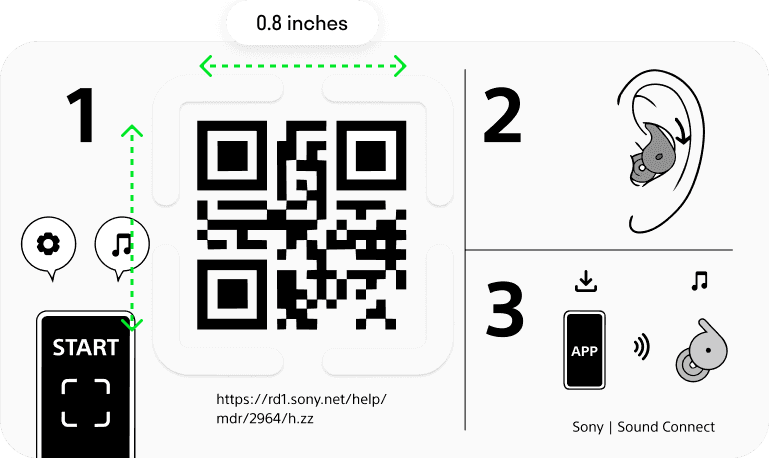
Proposed design: increased QR code size (0.8in × 0.8in)
Finding 02 — High severity
The Guide for QR tactile element failed its primary job
What happened
P3 took 1 min 59 sec to acknowledge the Guide for QR element, then 4 min 17 sec to find the QR code nested inside it — with assistance. P6 took 36 min 35 sec to feel the tactile element at all. The element designed to help was effectively invisible to both participants.
“Oh, no! I didn’t notice that this part was raised until you mentioned it just now.”
“I have neuropathy in my fingers too, [...] so even picking [the box] up now, I barely notice [the tactile element].”
– P6, participant with numbness in their fingers
the gap
The Guide for QR's tactile relief was too shallow to detect by touch alone. Its boundary wasn't sufficiently distinct from the surrounding packaging surface. The element's purpose was also unclear — users who found it didn't understand what it was for.
“It's just because it's kind of unusual to have something like [this tactile element] here so I just [thought] it’s the design of the box.”
“I just feel some… triangle shapes. But I wasn't able to know that it was a QR code.”
– P3, legally blind participant
design direction
Increase tactile relief height to minimum 1mm, add chamfered edges for clearer boundary detection, include a Braille label ("Scan QR Code") adjacent to the element, and reposition closer to the box opening edge for easier discovery.
current panel design with guide for qr tactile element
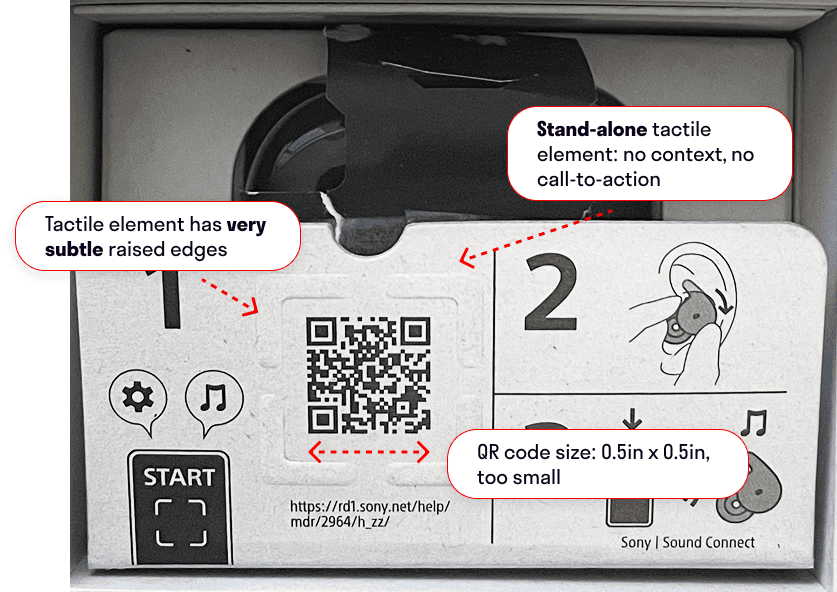
Current Guide for QR accessibility issues: shallow tactile relief, lack of tactile context, small QR code
Proposed redesign: increased QR size and tactile relief height, chamfered edges, braille label, tactile guiding line
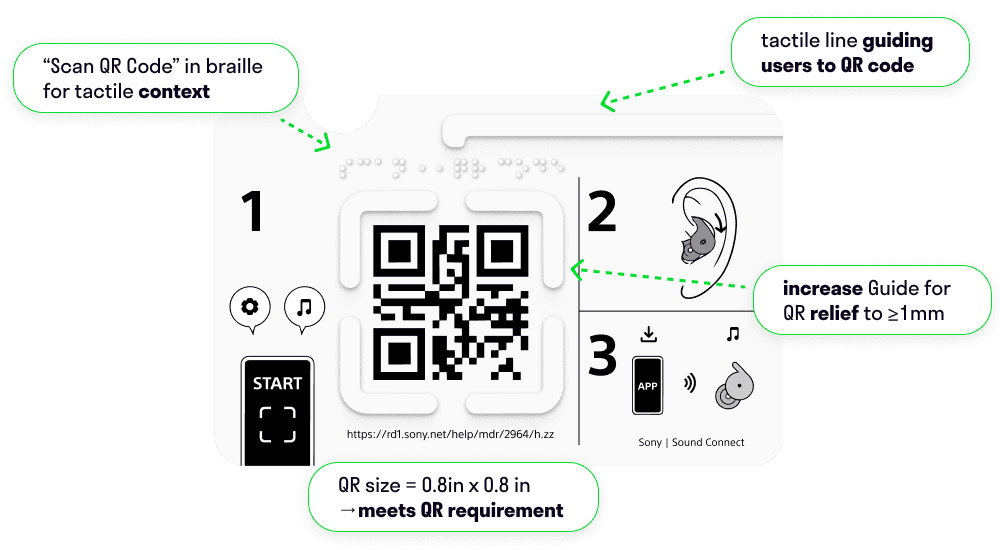
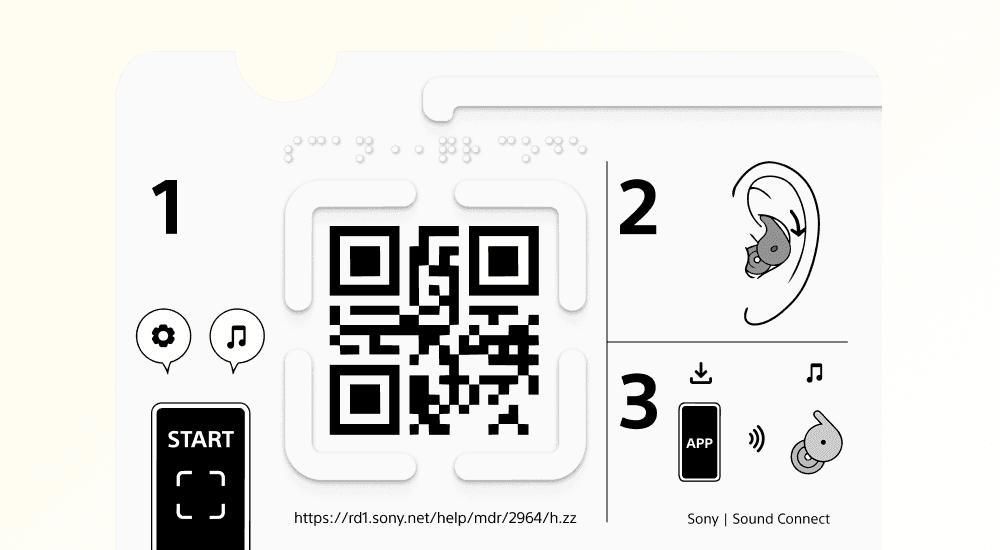
Proposed redesign sent to Sony
Finding 03 — High severity
The tutorial video was invisible to 5 of 6 participants
What happened
5 of 6 participants didn't watch the tutorial video without moderator prompting. Both visually impaired participants couldn't find it even with assistance. The help article page provided no visual affordance to indicate a video existed.
"I think maybe because my internet is not stable? But the video is not fully loaded there"
– P5
the gap
No video thumbnail, no preview image, and a play button alone was insufficient affordance. For screen reader users: the page lacked sufficient semantic structure — heading hierarchy, alt text, and landmark regions were all missing or incomplete.
design direction
Add video thumbnail preview, explicit "Tutorial video" below the player, voice narration track as an accessible alternative to music-only audio, and full screen reader annotation of the help article page structure.
current web help page: inaccessible
Current: No video thumbnail, no preview image, and a play button alone was insufficient affordance.
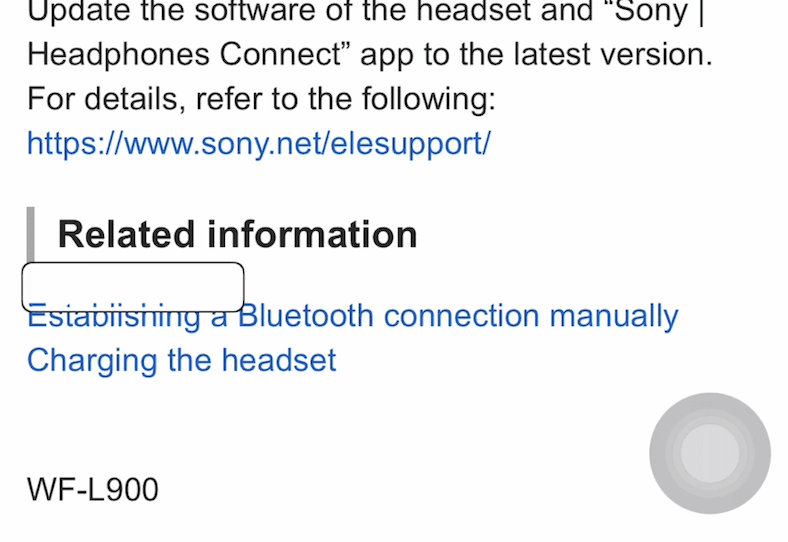
Current: Invisible links confused a participant’s screen reader.
Proposed redesign
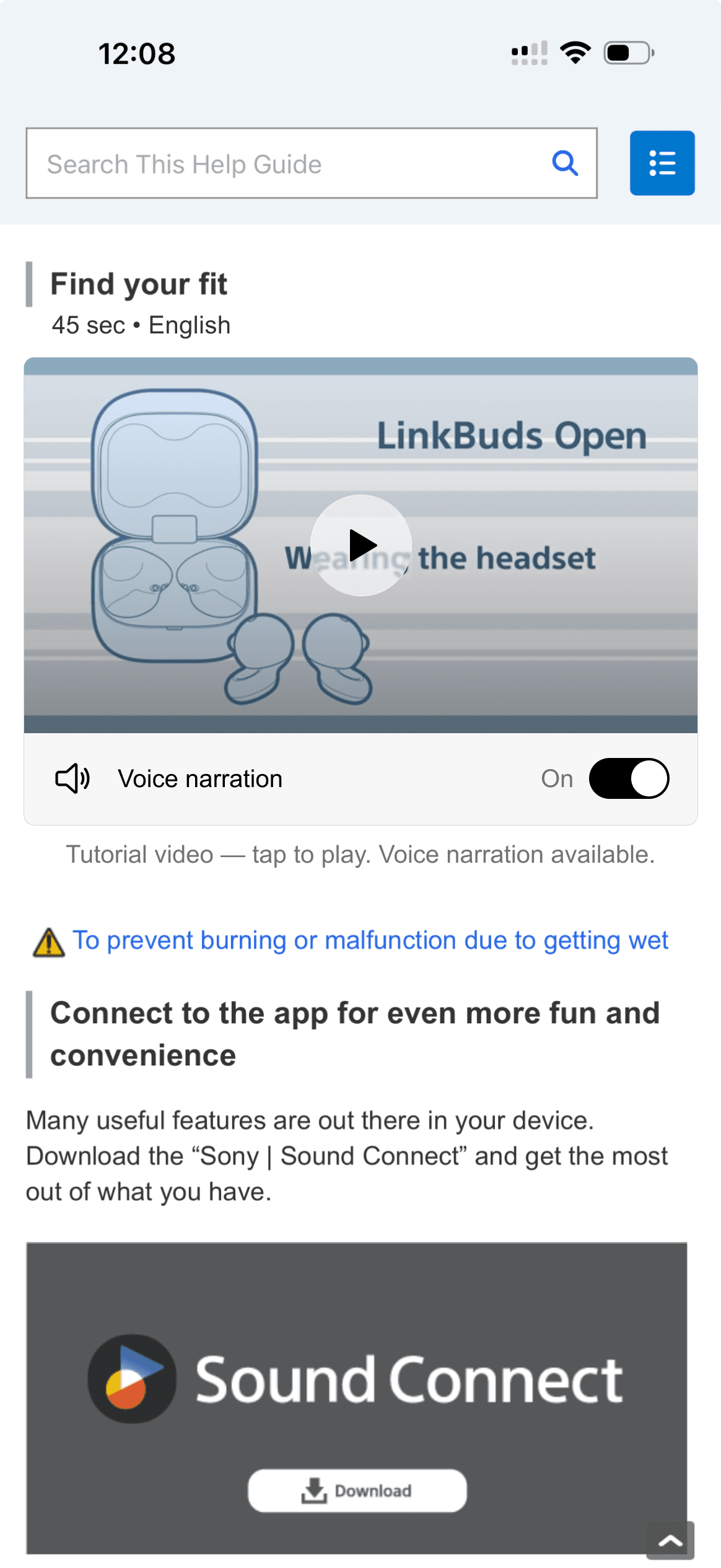
Proposed design: Added video thumbnail preview, explicit "Tutorial video" below the player, voice narration track as an accessible alternative to music-only audio
/ Design Recommendations
Four annotated recommendations delivered to Sony's product team
Each recommendation was severity-prioritized, paired with annotated design specifications, and directly tied to a finding from the evaluation. Sony's Sr. Human Factors Engineer received these as part of the final deliverable informing their OOBE accessibility strategy.
01 — Physical · High priority
Enlarged QR code with high-contrast treatment
Minimum 2cm × 2cm print size. Contrast ratio ≥ 4.5:1 (WCAG AA).
02 — Physical · High priority
Enhanced Guide for QR tactile element
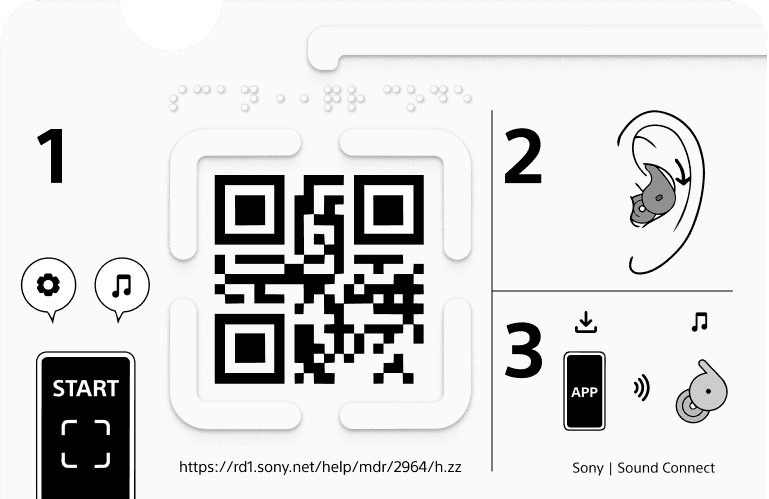
Relief height ≥ 1mm. Chamfered edges for tactile boundary. Braille "Scan QR Code" label.
03 — Digital · High priority
Tutorial video with thumbnail + voice narration
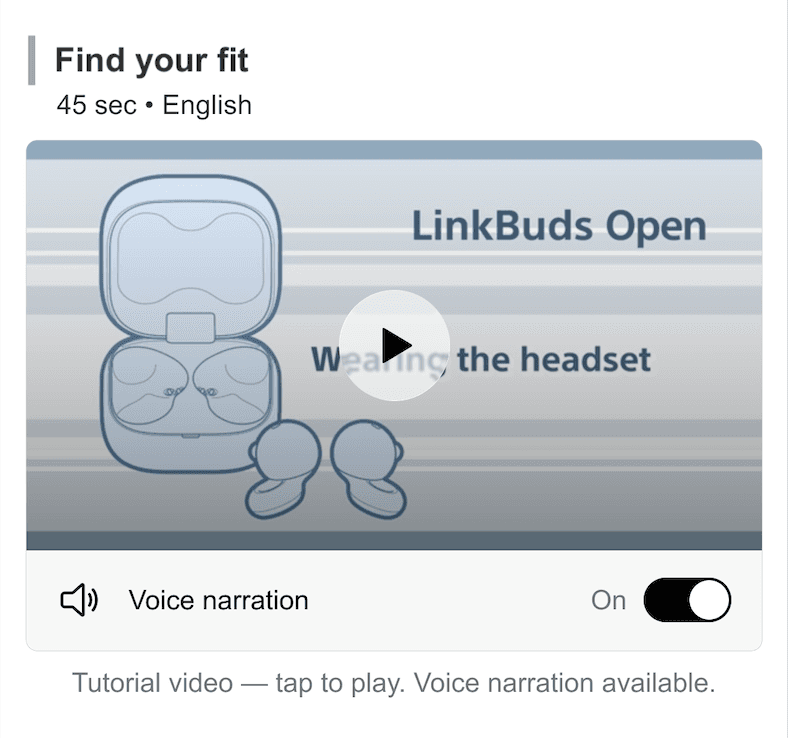
Visible thumbnail preview. Explicit "Tutorial video" subtitle. Voice narration track as accessible audio alternative. Descriptive alt text on all images.
04 — Digital · High priority
Screen reader-optimized help article
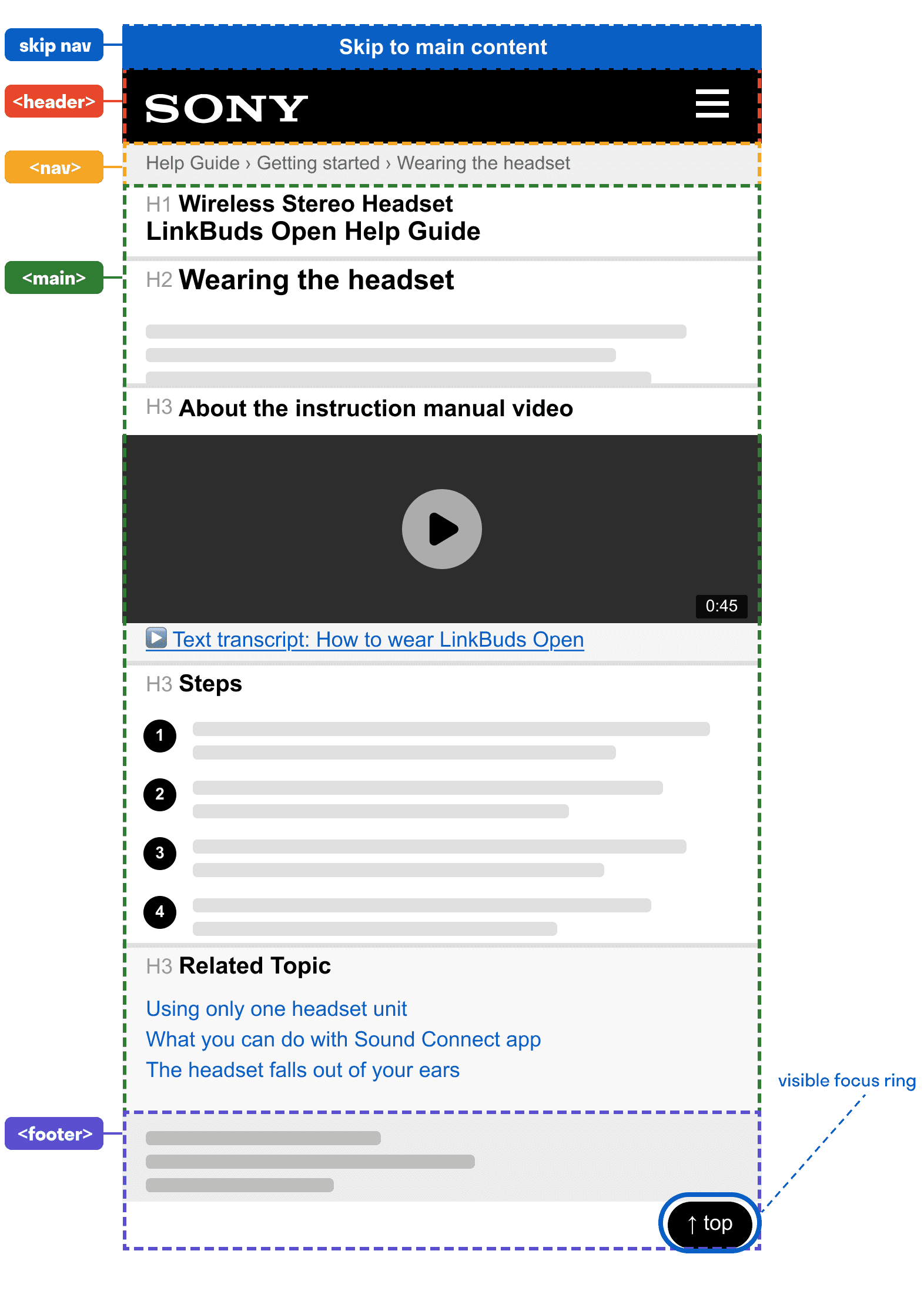
Proper heading hierarchy (H1→H3). ARIA landmark regions. Skip navigation link. All interactive elements keyboard-accessible with visible focus states.
/ impact
From 0% to feasible — and a direct line to Sony's OOBE strategy
for sony
Directly informed OOBE accessibility strategy
Severity-prioritized design recommendations delivered to Sony's Sr. Human Factors Engineer with annotated specifications for both physical packaging and digital enhancements — informing their ongoing accessibility roadmap for consumer electronics.
for users
QR scan success: 0% → feasible
The proposed QR code enlargement and Guide for QR redesign would bring scan success for visually impaired users from 0% to achievable with standard assistive technology — no moderator assistance required.
for the field
Physical + digital evaluated together
Most accessibility evaluations focus on digital interfaces. This evaluation treated physical packaging and digital onboarding as one continuous experience — recognizing that OOBE accessibility spans both surfaces.
/ What I Learned
Accessibility intent ≠ accessible experience
The Guide for QR was designed with good intent — it was supposed to help. It made things harder. Good accessibility design requires testing with actual assistive technology users, not assumptions about what will help.
The most well-intentioned accessibility feature in our study was also the biggest barrier.
Recruit for the real user, not the simulated one
Recruiting through 30+ advocacy organizations was more work than convenience sampling — and it changed everything. Participants who use assistive technology daily revealed failure modes that would never surface with simulated impairment.
Simulating disability is not the same as living with it.
Time-on-task is a design argument
9 seconds vs 9 minutes 33 seconds isn't just a data point — it's a brief. That number became the clearest argument for why the QR code needed a redesign. Quantitative data in qualitative research creates moments of undeniable clarity.
Numbers in qualitative research don't replace stories — they make them impossible to dismiss.
OOBE is a full-stack experience
Users don't separate "the box" from "the app." The moment the QR code failed on the physical packaging, trust in the entire onboarding flow dropped. Accessibility must be evaluated across the full experience.
The physical and digital are one experience. Evaluate them that way.