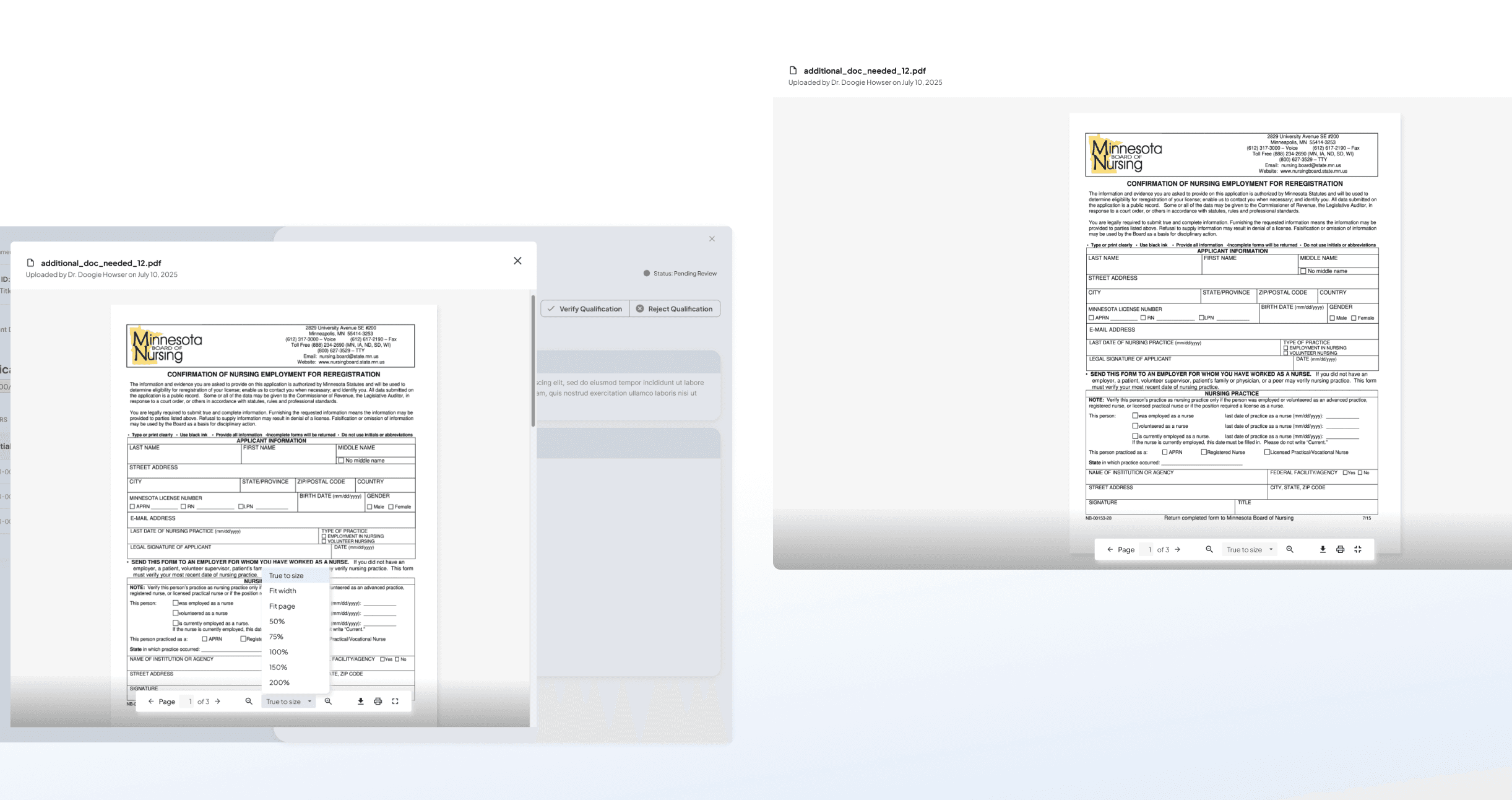
Owned an inline document viewer modal for MatterWorx VMS, reducing workflow friction for healthcare hiring managers
I joined Amergis Healthcare Staffing as a UX Design intern in summer 2025 on the MatterWorx team, and owned the design of an inline document viewer modal from concept through engineering handoff—iterated across 3 design versions against real stakeholder feedback, extended the MatterWorx design system, and delivered a phased implementation strategy that balanced feature depth with sprint timelines.
200+
hiring managers using credential verification daily
15 - 20
credential documents reviewed per manager each day
3+
potential adoptions across other workflows
2
variants design (simplified for beta, full-featured roadmapped)

Document Viewer component used for the credential review workflow.
Automatic downloads created workflow chaos
Healthcare hiring managers at Amergis review 15-20 credential documents daily as part of the worker verification process. Every time they clicked a document link, it automatically downloaded to their computer, forcing them to leave their workflow.
User Pain
Hiring managers experienced concentration breakdowns during credential reviews.
Business Impact
Core process affecting 200+ users with no current in-app preview solution
Understanding document preview in high-volume productivity contexts
I analyzed document preview patterns in Canvas LMS, Dropbox, Gmail, and Outlook to understand what decisions they made for users in review-heavy workflows and why.

Competitive analysis of document preview patterns across productivity tools.
leads to insights on how MatterWorx can handle file-previewing:
Focused action set
High-volume review contexts need quick preview + core actions. Feature bloat slows the primary task — most users never need annotation tools in a credential context.
Contextual metadata
File name, type, and uploader provide essential orientation without cluttering the view. Sequential review workflows rely on this to track context without re-navigating.
Graceful failure paths
When preview fails — unsupported format, corrupted file, network issue — users need a clear fallback. A dead white modal with no guidance is worse than no modal at all.
Sequential viewing rhythm
Most credential reviews involve 2–4 documents per assignment. The design should optimize for quick sequential viewing, not deep single-document interaction.
Three iterations toward a scalable component.
Iteration 01
Aligning with Design System Patterns
Feedback from UX Lead
"Top toolbar makes the design feel dated and different from the MWx design system."
Design response
Replaced the top toolbar with an island toolbar — a floating action bar that matches existing MatterWorx modal components and creates visual consistency across the platform.
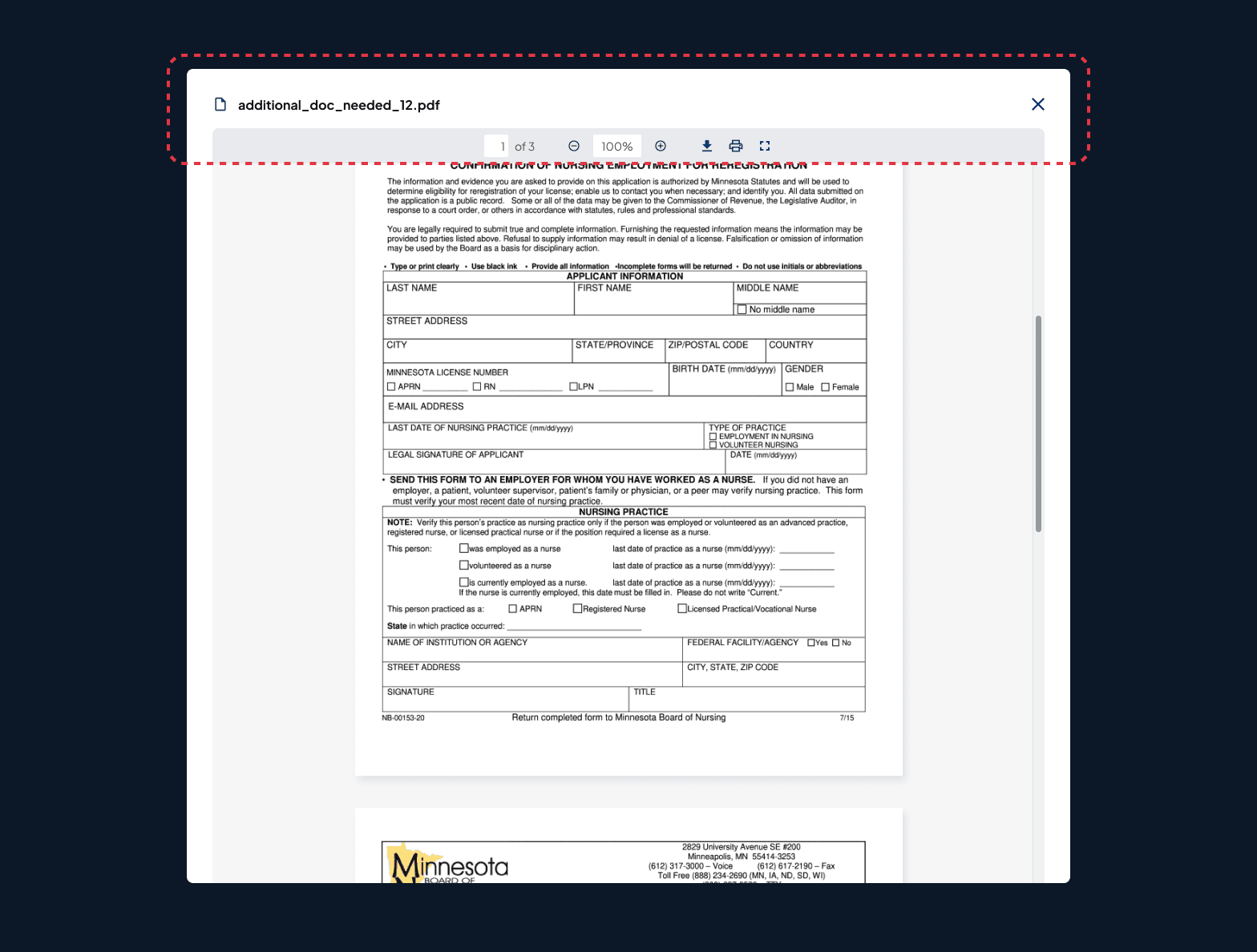
Before: Initial modal with top toolbar
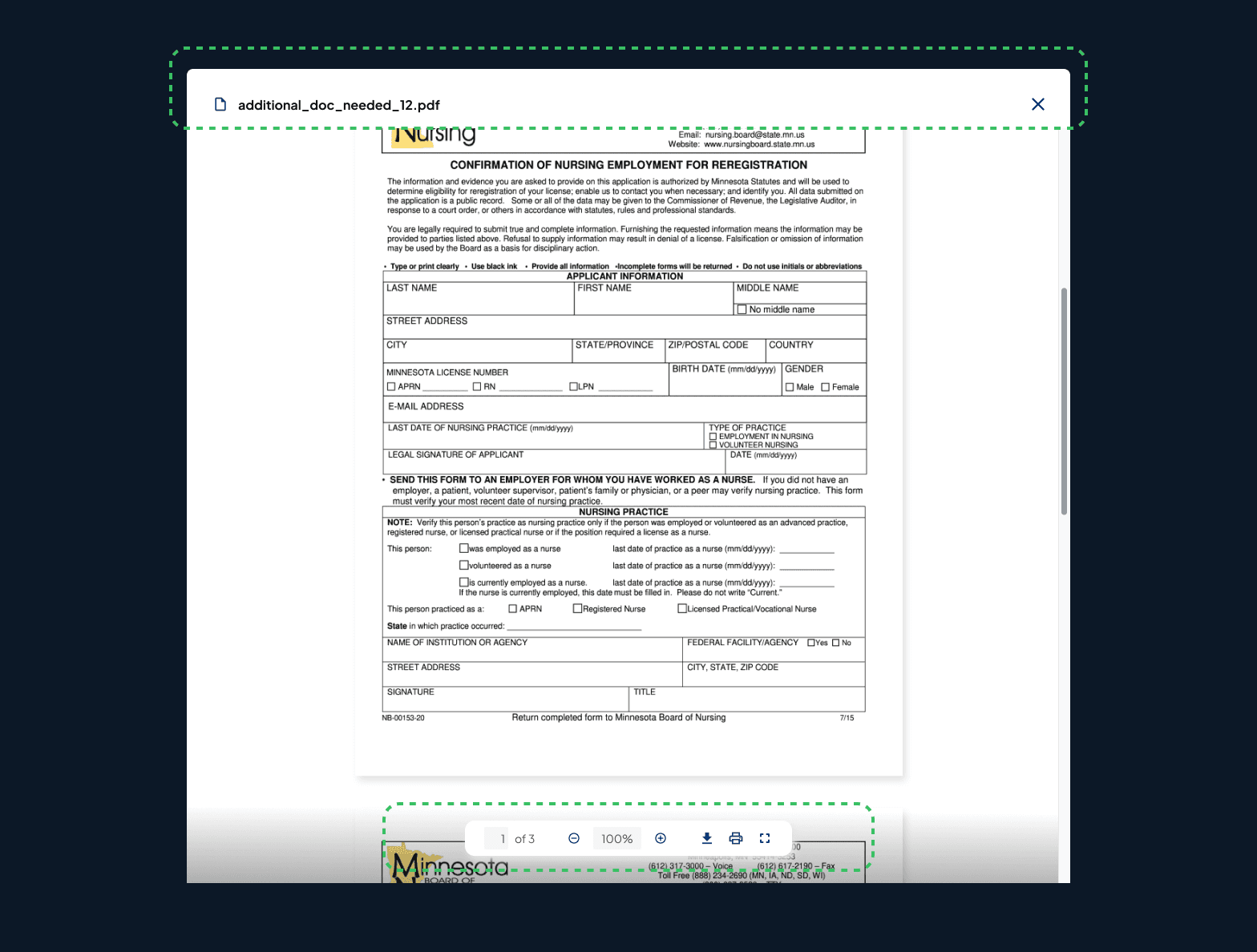
After: Island toolbar aligned with MWx design system
Iteration 02
Defining Component Boundaries
Feedback from UX Lead
"Verify/Reject Qualification are platform-level workflow decisions—they're not intrinsic to the preview modal component."
Design response
Removed workflow-specific actions from the component entirely. Created a more reusable, focused component that can be adopted across different workflows without modification.
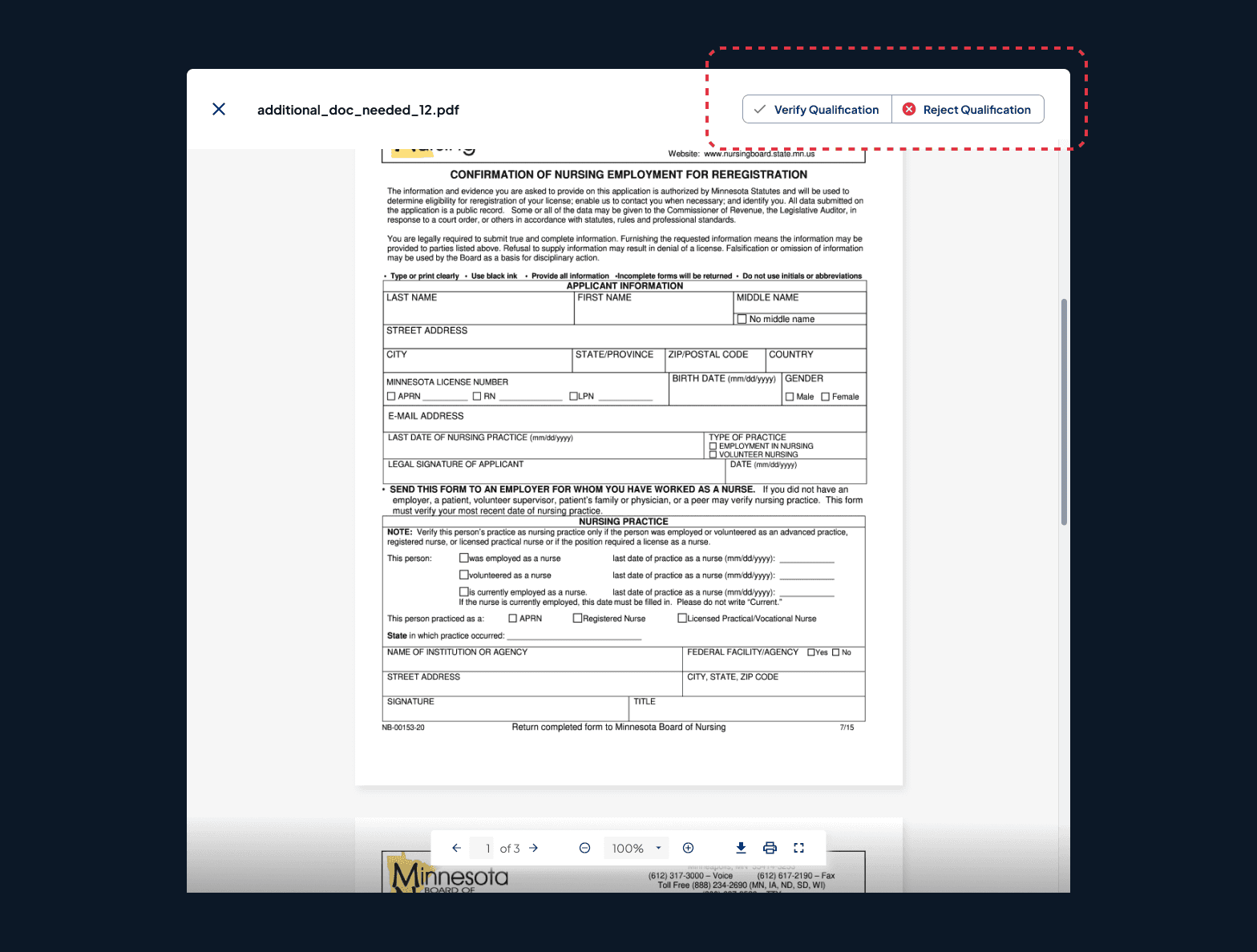
Before: Verify/Reject buttons included in modal
After: Platform-level actions removed, component focused
Iteration 03
Adding Essential Context Without Clutter
Design update
Added metadata subheader (file name, type, upload date) and refined toolbar visual hierarchy — giving users orientation without pulling focus from the document itself.
Research connection
This directly applied my benchmarking insight: high-volume review contexts require contextual metadata, not feature richness.
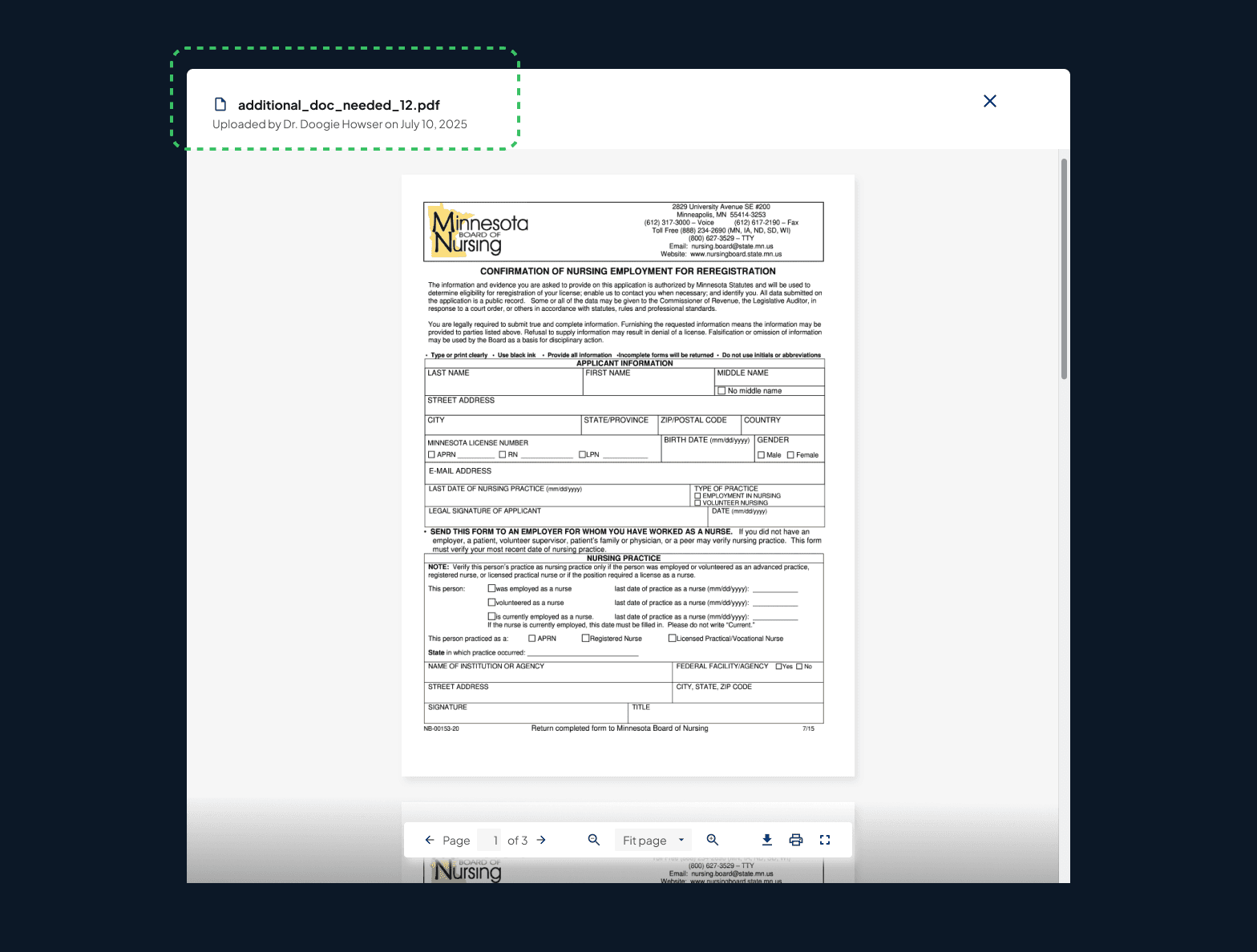
I added file metadata to the top of the modal.
Refined document viewer modal.
Balancing design vision with technical constraints
Challenge 01
Loading States
Developer concern: "The initial design didn't account for loading states—what happens if a file takes too long to load?"
Design response: Added a loading state with spinner + file metadata, so users see that the system is working and know which document is loading.
Loading state design
Why it matters
Managing expectations during network delays prevents the "is this broken?" moment that leads to repeated clicks and eroded trust in the platform.
Challenge 02
Error Handling
Developer concern: What happens when preview fails? There are multiple failure modes and no consistent pattern in the existing system.
Design response: Defined three distinct error categories with specific user messaging and technical handling for each.
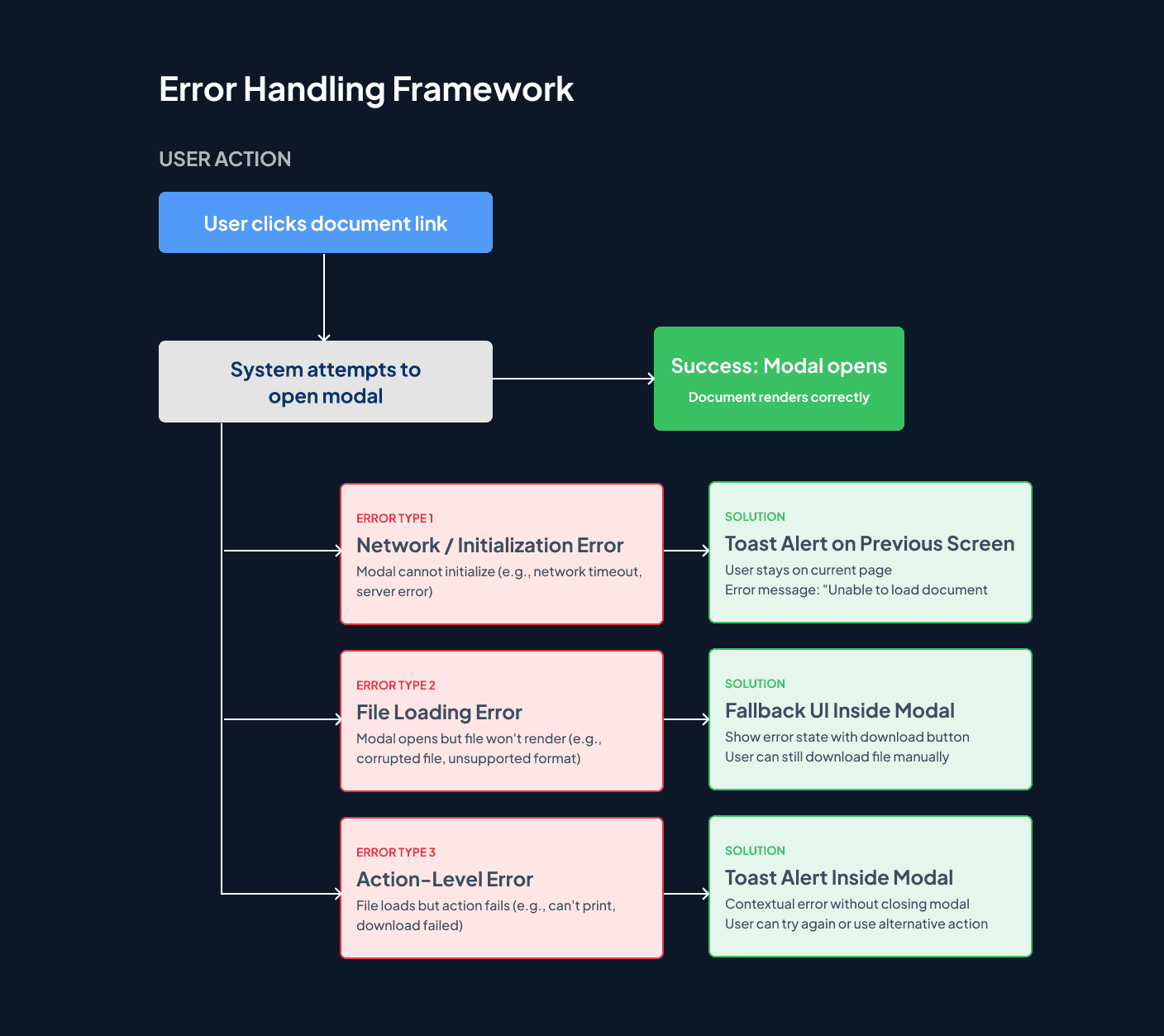
Error handling diagram
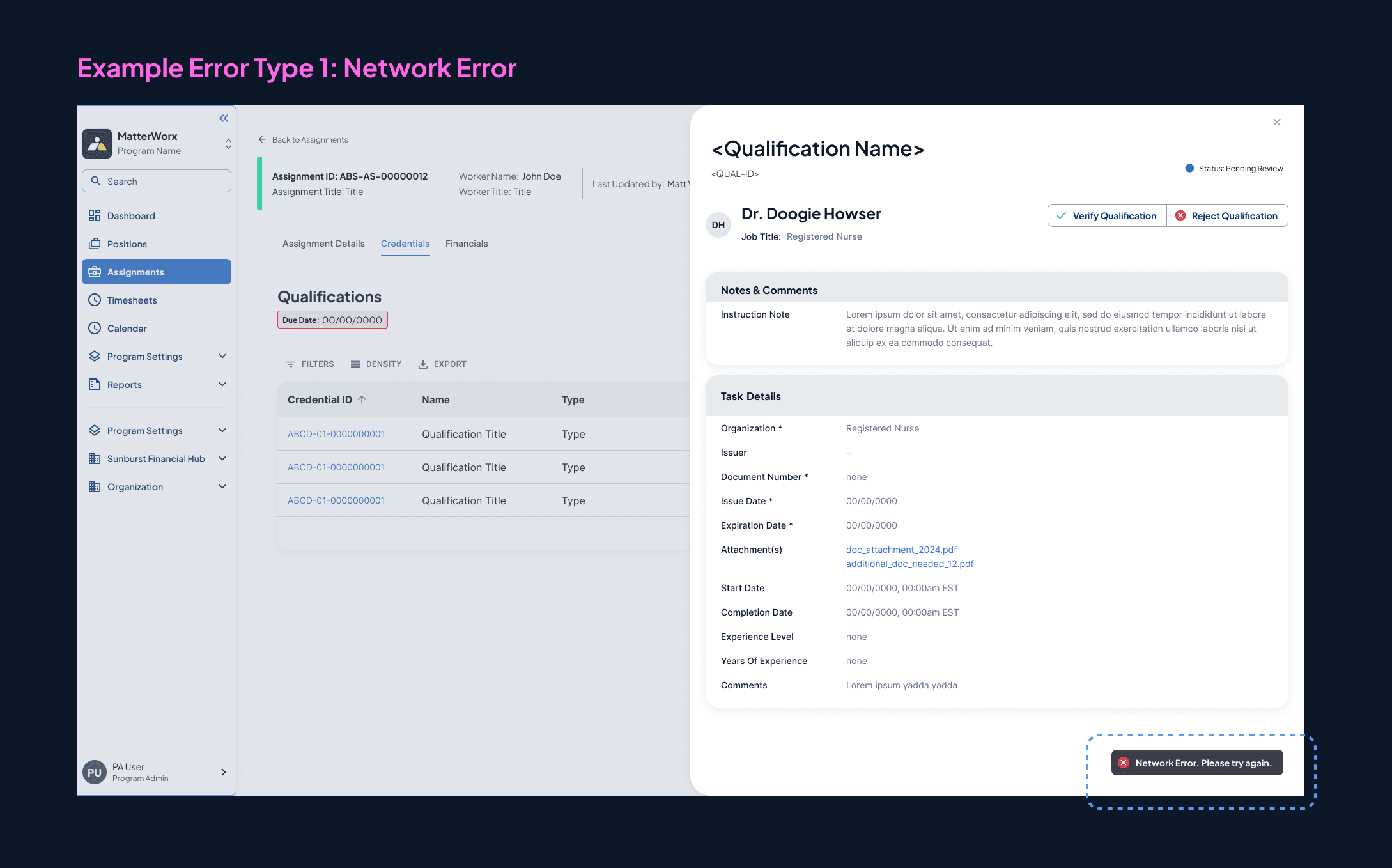
Type 1 — Network/initialization error
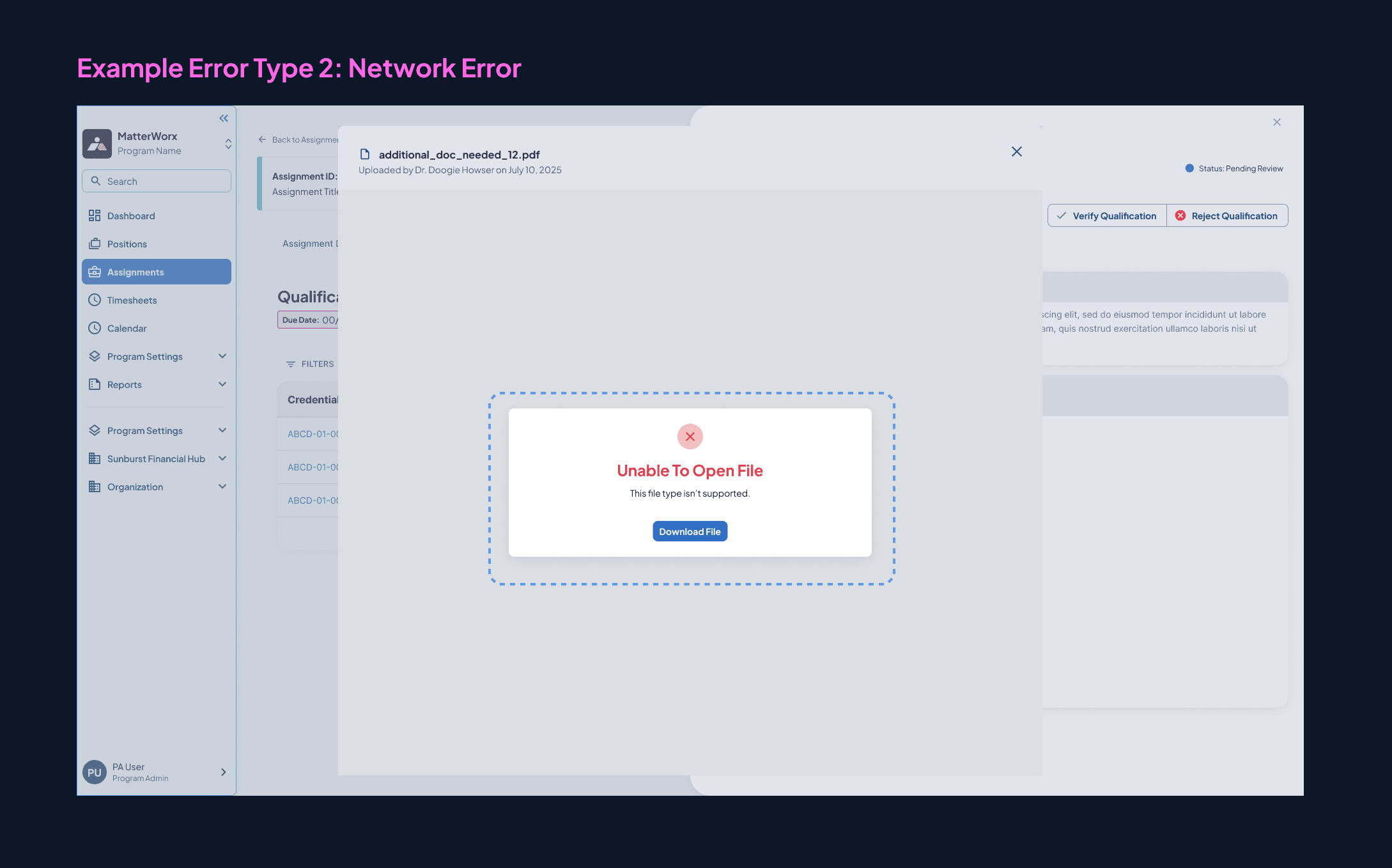
Type 2 — File loading fallback
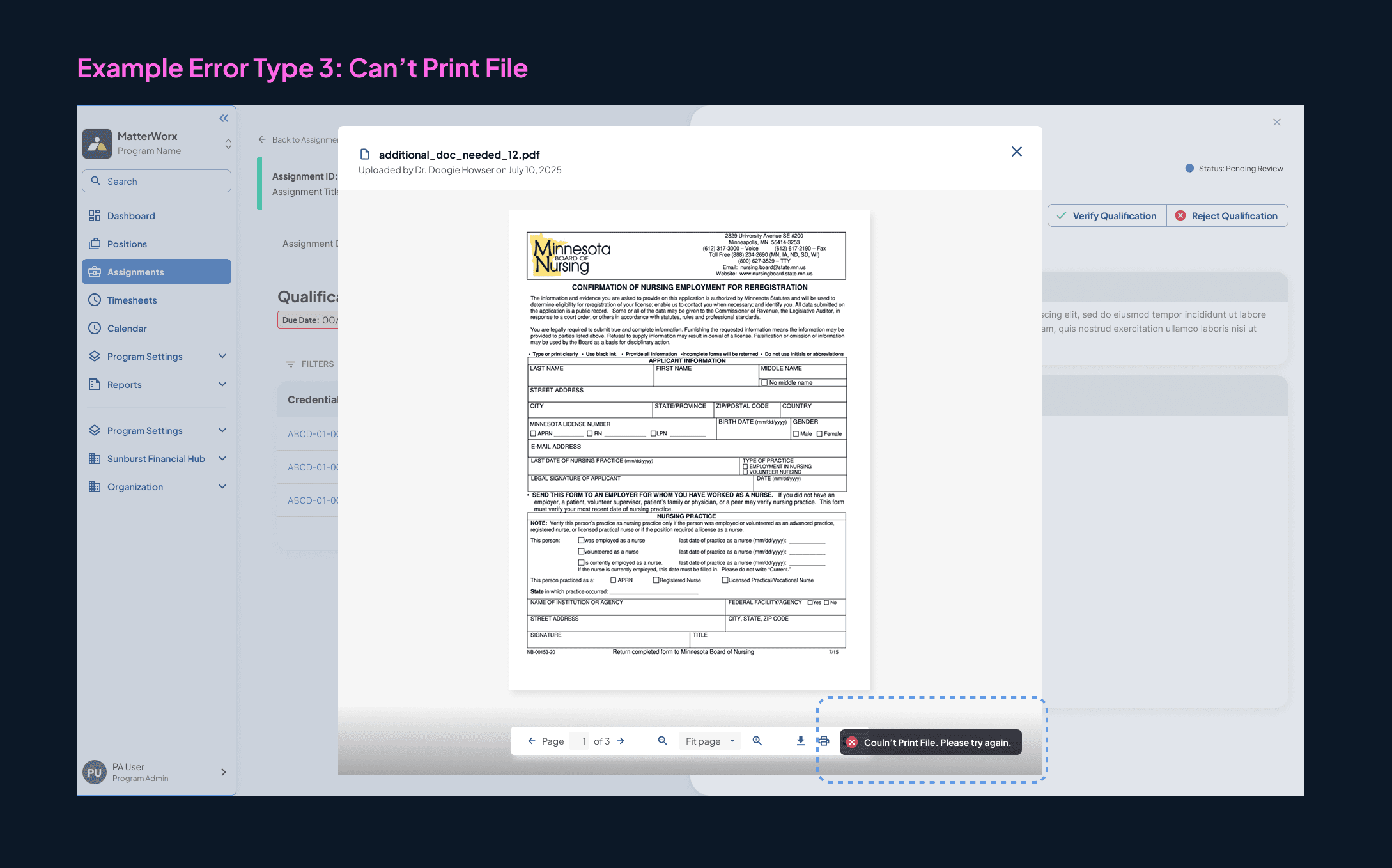
Type 3 — Action-level toast alert
Why it matters
This framework gave engineers concrete implementation guidance and reduced ambiguity during sprint planning.
Challenge 03
Sprint Timeline Pressure
Developer concern: "The full toolbar is useful but complex to build—it's a challenge for delivering the feature in the upcoming sprint."
Design response: Created a simplified variant (no toolbar, essential actions in header only) + documented the full-featured version for future roadmap.
What shipped, and what it means beyond this project
👥 for users
Eliminated context-switching
200+ hiring managers reviewing 15–20 documents daily now stay in-app, in-flow — without managing external files or losing their place in the credential review workflow.
🎨 for product
A reusable pattern, not a one-off
The document viewer is being extended to assignment documents and timesheet attachments. The island toolbar pattern is now part of MatterWorx's core component library — multiplying impact beyond the initial use case.
⚡️ for development
Reduced developer ambiguity
Structured error handling framework with three distinct states gave engineers concrete implementation guidance. Loading state pattern library covers 5 scenarios across MatterWorx platform-wide.
Good enough shipped > perfect delayed
The simplified variant taught me to separate "MVP" from "vision." By designing both simultaneously, we gave the team a fast path to user value while preserving the richer future state. Shipping wasn't a compromise — it was a strategy.
This dual-track approach is now my default for any feature with competing timeline pressures.
Design systems require intentional contribution
Contributing a new component to an established system isn't just about matching visual style. I learned to study existing patterns, document integration points, and think about how five other teams might use this component in contexts I can't anticipate.
The island toolbar pattern is extensible to 3+ workflows because we designed for reusability from day one.
Components should know their boundaries
Iteration 2 was the most educational moment of the internship. Removing Verify/Reject from the modal felt like a loss of functionality. In practice, it made the component genuinely reusable. A component that knows too much about its context is a component that can't be shared.
The question I now ask first: who owns this decision, and should this component care?
Designing with engineers, not for them
Anticipating developer questions before they were asked — loading states, error handling, phased delivery — reduced friction during build and built trust with the engineering team. Good handoff is a design skill.
big appreciation <3
Thank you to Geoff, Joe, and Chris for helping me with this project!
Microsoft
2026
Trust calibration and verification support for agentic AI in enterprise video conferencing tools
/ ms hcde capstone
Sony Electronics
2025
Improve the accessibility and OOBE of Sony LinkBuds Open earbuds for users with visual impairments and dexterity challenges
/ accessibility evaluation