

I led a project on trust and verification for agentic AI systems, in collaboration with Microsoft XSD researchers.
My contributions
Created user trust behavior framework from synthesizing 30+ research papers on sociology, service design, and automation
Designed and piloted the user interview protocol (7 participants, 60 min each)
Led co-design workshop facilitation: scenario design, warm-up, synthesis
Expanded scope from post-meeting to the full meeting lifecycle
Narrowed 20+ co-design concepts to two focused prototype directions
Built interactive HTML prototypes used in concept validation and usability testing

Fourward team alongside our instructor during the MS HCDE capstone showcase!
44% of lapsed Copilot users cite distrust as the reason they stopped.
Trust concerns are the primary barrier to production deployment. So the brief we got from the Microsoft XSD team for this project was deliberately open — how do you design for trust and verification in AI?
This pushed me to think about domains. AI is used in multiple tools across the Microsoft 365 Suite. Therefore, my next question was:
In which context do trust and verification matter most for AI adoption?
320M+
active Microsoft Teams daily users
56%
power users are more likely to use AI to catch up on missed meetings
Microsoft Teams CoPilot generates AI summaries after user's meetings. These artifacts often go unverified, or very lightly skimmed.
After researching Microsoft's Work Trend Index, Copilot adoption trends and statistics, we narrowed down to workplace video conferencing. This is a domain with established AI use cases, rapid adoption growth, and distrust as a documented reason for abandonment. Verification behavior was concrete and observable. We could study real practices, not just attitudes.
Understanding the relationship between trust and verification in video conferencing
the trust onion

Literature review synthesis mapped the concept of trust through 4 layers (like an onion!). It operates across all four, with human trust as the core, and each layer after builds upon the foundational philosophical concept of "human trust."
“Good calibration [...] can mitigate misuse and disuse of automation, and so they can guide design, evaluation, and training to enhance human-automation partnerships.”
Lee, J. D., & See, K. A. (2004). Trust in Automation: Designing for Appropriate Reliance.
calibrated trust in practice = verification
Trust breakdown leads to tool abandonment. Verification needs to be inserted between these two states.
the verification cascade
Users expressed that their workflow generally consisted of four escalating layers — but most stop at layer one, the most unreliable.


why do they stop at the first layer?
Verification Gap 1
Source tracing friction
"I remember like, hey, I want to refer back to [this point], but I don't even know where it is. Everything is just everywhere."
— P2, Product Manager
Verification Gap 2
Hallucination detection
"These things are so thirsty to make you happy that they will almost infer intent… as opposed to actually bringing you objective truth."
— P3, Senior UX Designer
these two gaps became the design brief
How might we design a fast, well-integrated verification experience for workers — while maintaining healthy skepticism toward AI-generated meeting artifacts?
"How might WE?" — designing with users
I facilitated a 2-hour online co-design workshop with 4 returning participants. Using a 9-panel storyboard following Jonathan, a senior engineer, we generated ideas together across before, during, and after the meeting. Expanding scope to all phases was a deliberate call: verification failures often originate upstream.


Co-design boards. Participants draw, write, and annotate ideas based on our scenario.
Our team tested two concepts with a unanimous result, but I learned something from the unselected version.
Concept A: Verification dashboard — Preferred by all test participants

A full report dashboard that flags items to verify with a confidence scale (high, medium, low)
Concept B: Verification chatbot — not selected
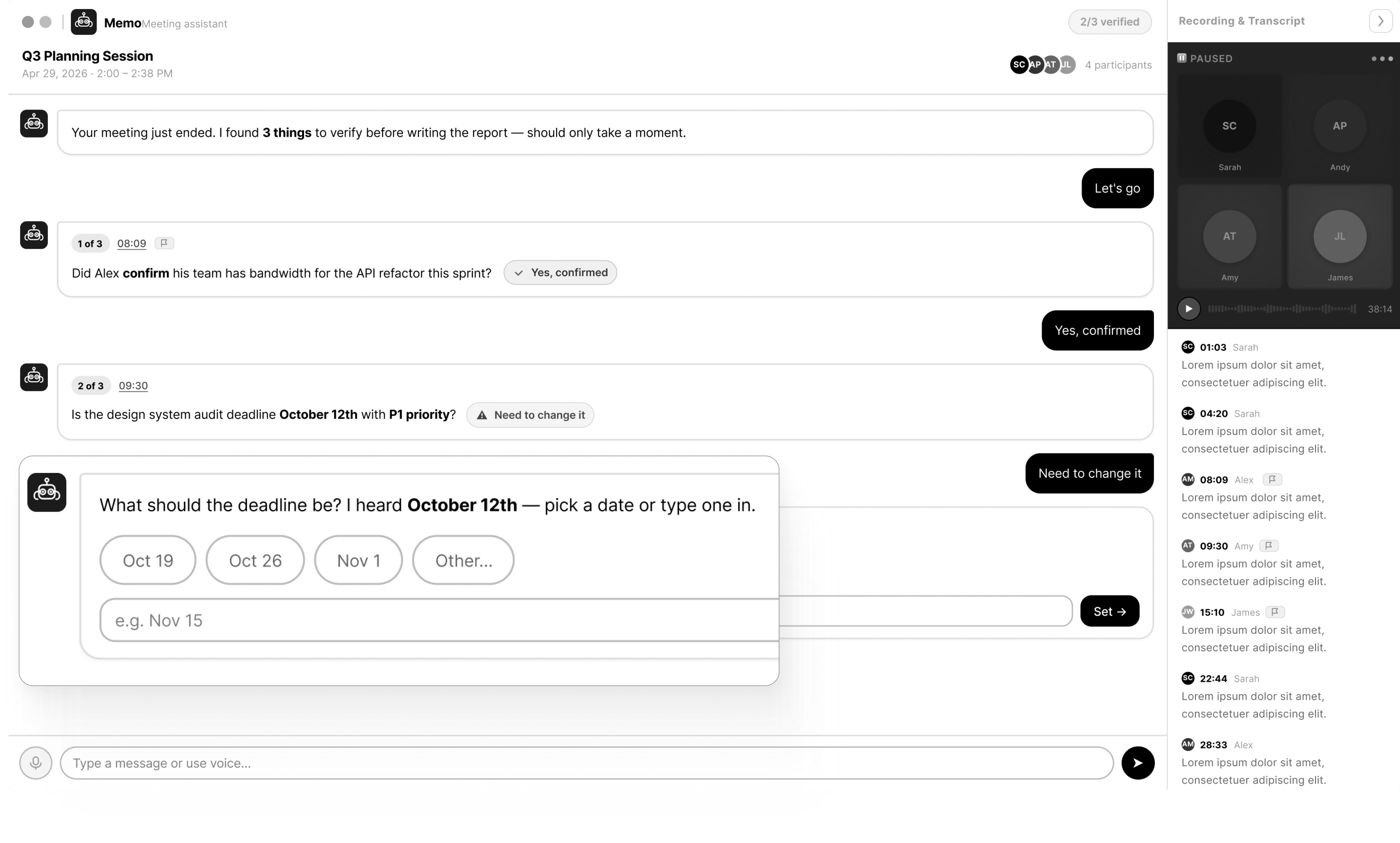
An AI assistant that walks through each uncertain item in conversation and asks follow-ups
Though it was not selected, participants preferred the content design from this option:
"I liked that it said it wasn't sure. It felt more honest than flagging something in red."
— P4, Concept Validation
A business constraint we did not expect: confidence signaling?
"Confidence signaling, while good for users, won't get green lit by leadership. It communicates that our AI is incapable."
— Our mentor from Microsoft
little guy — our mascot — was born!
The animated blob mascot makes the system more friendly and honest.

Asks rather than asserts — hedging language replaces confidence scores


Live Recap Panel
Overview: Live Meeting Recap Panel. Collapsed and expanded states.
Item cards — editable, traceable, flaggable
Decision cards
Flag for review · Source chip · Inline edit

To do cards
Assign to participants in real time · Three states: assigning / assigned / unassigned

End-of-Meeting Co-Review
The host-triggered wrap-up modal is the primary verification moment: two-column layout, all items inline-editable, send immediately or block calendar time for later.
Scrollable recap with summary, decisions, and to-dos

Scrollable recap with Summary, Decisions, and To-Dos. Actions mechanisms are similar to the Live Meeting Recap panel, with the additional Add Item option available to meeting host.
Send recap panel

Send recap panel. Host can select recap participants to send immediately, or choose a time from their calendar to come back and review the recap from their meeting hub.
Post-Meeting Recap Review
Full Recap tab — low-confidence items surfaced
Meeting Recap Review. Confidence signaling + source tracing working together.
The workflow reframe
Usability testing confirmed the core hypothesis. Our design delays tool abandonment by inserting a structured, low-cost verification step between low trust and disengagement.


"I like these real-time stuff! I won't have to take notes and it's easy to use!"
— P1, Usability Study, on the Live Recap Panel
"This is really good! I like [that the AI is] looking over and making sure everything is correct! I'd totally use this!"
— P1, Usability Study, on uncertainty flagging and the recap dashboard
A strategic output for Microsoft and beyond
Trustworthy AI cannot be built through product design alone. We developed an exploratory Plan → Design → Measure framework — delivered to Microsoft XSD as part of the final handoff — for cross-functional teams thinking about AI adoption at every level.
plan
Why adopt, and who's responsible when it goes wrong?
Define purpose, stage rollout so trust is earned rather than assumed, close the accountability gap by naming who owns AI outputs.
Product leaders, TPMs, customer success
design
How to build trust without adding cognitive burden?
Transparency should be lightweight and contextual. Human control over consequential actions is the mechanism through which trust becomes calibrated.
Product designers, researchers, engineers
measure
Is adoption actually working — beyond usage numbers?
High usage can hide falling trust. Verification time that drops may signal over-reliance. Emotional signals are absent from standard product analytics.
PMs, researchers, customer success
Some things I've learned along this project
🧐 Research depth changes what you design.
The difference between designing for a brief and designing from evidence is visible in every decision: why the panel is passive, why it doesn't alert, why the host triggers the review.
🤖 Designing for AI requires designing for trust, not just usability.
Standard usability heuristics — efficiency, learnability, error recovery — don't fully account for the trust dynamics in AI systems. A feature can be perfectly usable and still erode appropriate reliance. We're designing for calibration, not just interaction.
🙆🏻♀️ Co-design is a great design method, in addition to being a research method!
The co-design workshop generated 20+ ideas in 2 hours that we wouldn't have reached through desk research alone. More importantly, the workshop revealed which problems participants cared about — the before/during/after expansion came directly from what participants wanted to design for.
💡 Speculative work requires more rigor…
Because we're designing for a future AI capability (confidence tiering in Copilot), every design decision needs stronger justification than product work against existing systems. We can't point to a shipped feature — we have to point to research.
2025
Eliminate context-switching disruptions for healthcare hiring managers' credential verification workflow
/ vendor management system / design system
Sony Electronics
2025
Improve the accessibility and OOBE of Sony LinkBuds Open earbuds for users with visual impairments and dexterity challenges
/ accessibility evaluation